

{% link ‘Gitea Actions 初体验’ ‘Gitea Actions’ ‘/posts/75.html’ %}
最近把Git的托管放回到本地的服务器上,博客也从Github搬迁回家里的服务器上,Github Actions也换成Gitea Actions托管模式。
{% link ‘Act Runner’ ‘这是Gitea Actions的Runner’ ‘https://docs.gitea.com/zh-cn/1.20/usage/actions/act-runner' %}
先创建一个存放docker compose文件的目录。
# 新建一个date的目录
mkdir /date

# 进入目录
cd /date新建文件 .nev 和 docker-compose.yml
# .nev

# 容器名称
CONTAINER_NAME="act_runner"
# 限制cpu核,填写0为不限制
CPUS=0
# 限制运行内存,填写0为不限制
MEMORY_LIMIT="1024M"
# 你的gite的URL
GITEA_INSTANCE_URL="gitea域名"
# docker运行镜像
RUNNER_LABELS="ubuntu-latest:docker://gitea/runner-images:ubuntu-latest"
# Runner名称,显示在Actions
RUNNER_NAME="2H2G-阿里云"
# Runner的令牌,在管理后台获取
RUNNER_REGISTRATION_TOKEN="u2LP4dxxSdNXTsL"

{% link ‘Node’ ‘Node’ ‘https://hub.docker.com/_/node' %}
{% link ‘gitea/runner-images’ ‘gitea/runner-images’ ‘https://hub.docker.com/r/gitea/runner-images/tags' %}
如果你想自定义镜像可以在Docker Hub 上面查找,node,debian 这些的都可以用。
查看官方文档,找到自定义的镜像方法,以 ubuntu-latest:docker://node:16-bullseye 它意味着Runner可以运行带有 runs-on: ubuntu-22.04 的Job,并且该Job将在使用node:16-bullseye 镜像的Docker容器中运行。
假设你想自定义镜像名称为 node20 docker镜像为 node:20.18.1-bullseye 可以拼接成node20:docker://node:20.18.1-bullseye 然后修改.env文件相应的字段。
# docker-compose.yml
version: "3.8"
services:
  runner:
    image: gitea/act_runner:nightly
    container_name: ${CONTAINER_NAME}
    deploy:
        resources:
            limits:
                cpus: ${CPUS}
                memory: ${MEMORY_LIMIT}
    environment:
      CONFIG_FILE: /config.yaml
      - GITEA_INSTANCE_URL=${GITEA_INSTANCE_URL}
      - GITEA_RUNNER_REGISTRATION_TOKEN=${RUNNER_REGISTRATION_TOKEN}
      - GITEA_RUNNER_NAME=${RUNNER_NAME}
      - GITEA_RUNNER_LABELS=${RUNNER_LABELS}
    volumes:
      - ./config.yaml:/config.yaml
      - ./data/data:/data
      - /var/run/docker.sock:/var/run/docker.sock
      - /etc/localtime:/etc/localtime:ro
- /etc/timezone:/etc/timezone:ro最后执行 docker-compose up 命令来启动该容器。

在管理后台就可以看见刚刚创建的Runner容器。
开启Actions Runner
在你想开启的仓库点设置,找到仓库设置 往下找到 启用Actins 勾选上
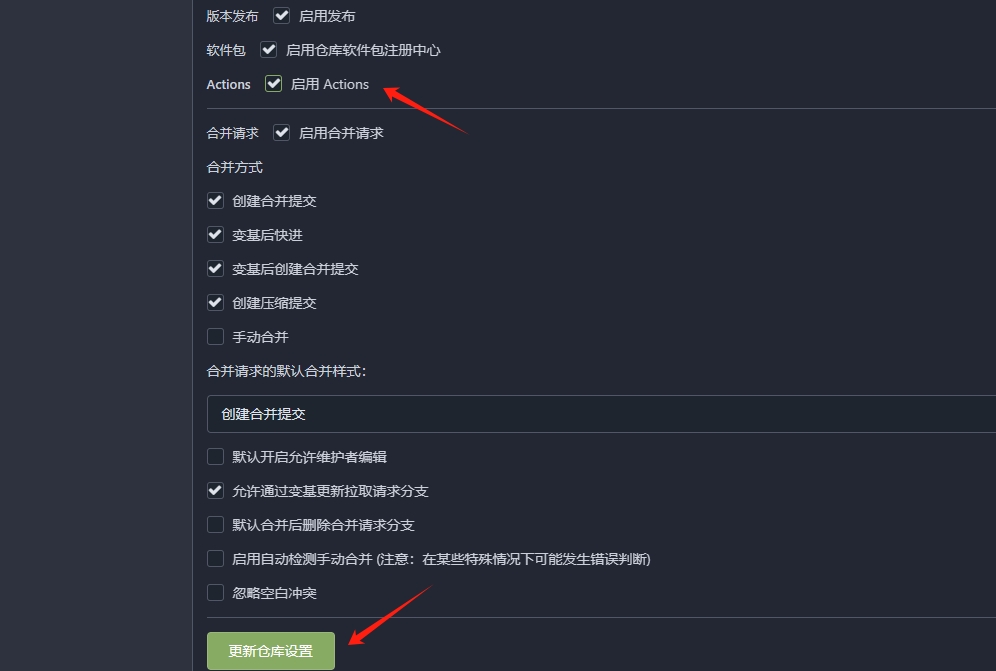
在仓库新建 .gitea/workflows/build.yaml 进行测试。
name: Gitea Actions Demo
on: [push]
jobs:
  Explore-Gitea-Actions:
    runs-on: node20
    steps:
      - run: node -v

runs-on: node20 这里是填刚刚自定义镜像的名称。首次运行会进行拉取镜像,会执行比较长时间,等镜像缓存好就快了。
- run: node -v 是查询node的版本命令。版本显示 20.18 完全安装正确。
其他语法命令和Github Actions的语法命令和软件包都高度兼容。
评论