

创建文件
在博客的根目录下的 source 文件夹,还有一个是 themes 的 source 文件夹(来自主题,但是不推荐放在那里)
在里面创建好所需要的文件夹,例如 css、js、img、fonts 等等这些文件夹,还有其他的配置文件可以自行创建。
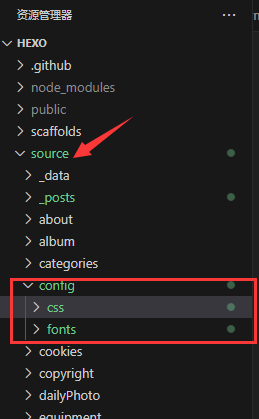
我这里为了不要这么乱,所以把所有 DIY 文件归类到config 目录下
引用自定义文件
直接在主题的配置文件即可,我的安知鱼主题文件为 _config.anzhiyu.yml / Butterfly 的配置为 _config.butterfly.yml ,如果没有在根目录下创建过配置文件,可以在主题文件下找到 _config.yml
在主题配置文件中找到配置inject
css 文件一般在 head 引入,js 文件一般在 bottom引入,特色情况除外。
# Inject
# Insert the code to head (before '</head>' tag) and the bottom (before '</body>' tag)
# 插入代码到头部 </head> 之前 和 底部 </body> 之前
inject:
  head:
    # 自定义css
    # - <link rel="stylesheet" href="/css/custom.css" media="defer" onload="this.media='all'">

  bottom:
    # 自定义js
# - <script src="/js/xxx"></script>如果引入多个文件可以往后添加一行
head:
  # 自定义css
  - <link rel="stylesheet" href="/css/custom.css">
  - <link rel="stylesheet" href="/css/fonts.css">
评论